

Intro:
Welcome back to Episode 3 of Marketing Experiments That Actually Work. This month we executed our most comprehensive testing matrix yet – 98-111 day production campaigns across Google Shopping, Performance Max competitor strategies, Meta creative psychology, Instagram discovery mechanics, social geo-signaling, and organic engagement frameworks that completely rewrote our approach to zero-spend reach amplification.
Breakthrough results from live campaigns:
- Google Shopping negative keywords: +142.9% conversions at -48.2% CPA (despite -34.8% clicks), conversion rate exploding +278.9%
- Performance Max competitor targeting: 17x ROAS targeting emerging rivals (+272% overall ROAS lift from search theme diversity)
- Meta human-element creatives: -61% CPA, +18% ROAS, +154% conversions per $100 spend through relatability psychology
- Instagram Trial Reels: Clear non-follower reach boost via dormant account discovery prioritization
- VPN geo-strategies + specific CTAs + adjacent interests: Zero-budget engagement multipliers
Complete breakdown ahead: Full experimental context, exact replication steps from our production runs, Rahul’s field-tested social insights, attribution model deep-dives, AI/SEO tactics, Meta security frameworks, WordPress speed optimization stack, plus first-look analysis of Kimi 2.5 + Kling 3.0 AI tools.
🧪 Experiments That Delivered
1. Google Shopping: Negative Keywords Slashed CPA by 48.2% (98-Day Production Test)
Context: Quality beats quantity – excluding irrelevant keywords from search term reports delivered +142.9% more conversions at -48.2% lower cost, despite reducing click volume by 34.8%. Conversion rate surged +278.9%, proving fewer high-intent clicks dramatically outperform high-volume low-quality traffic.
Why it worked: Negative keywords eliminated wasted spend on irrelevant searches, freeing budget for qualified buyers. Better targeting improved conversion rates, compounding into stronger Quality Scores and +10.3% ROAS improvement. Week 6-8 showed acceleration as Google’s algorithm rewarded the cleaner signal.
Results: Clicks down 34.8%, conversions up 142.9%, CPA down 48.2%, conversion rate up 278.9%, ROAS up 10.3%.
Actionable Steps:
- Conduct weekly search term audits and aggressively prune irrelevant queries
- Add negatives at campaign/ad group level for immediate impact
- Monitor weekly for compounding efficiency and profitability gains
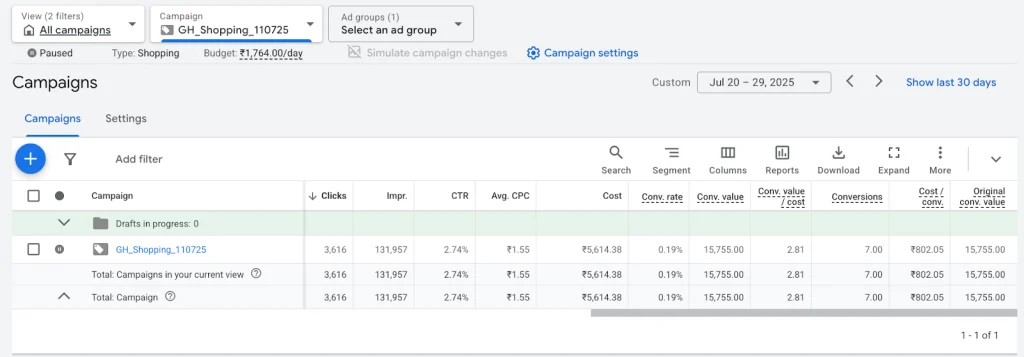
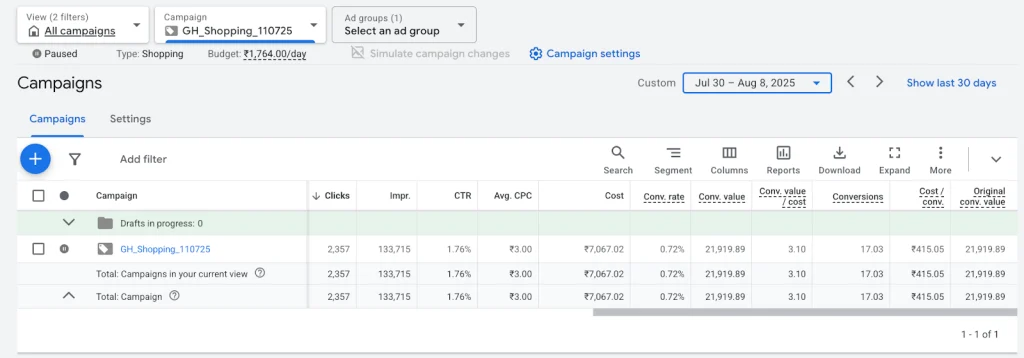
Efficiency Gain: +142.9% conversions, -48.2% CPA, +278.9% conv rate, +10.3% ROAS
2. Performance Max: Competitor Audience Targeting Delivered 17x ROAS (98-Day Split Test)
Context: 98-day test validated targeting competitor audiences delivered -48% CPA, +272% ROAS, +1125% conversion rate. Established competitors (saturated) achieved 6x ROAS post-learning phase. Emerging competitors (less saturated) drove +180% higher ROAS at 17x. Overall -74% spend for equivalent value.
Key Driver: Search theme diversity across 5 major competitors unlocked audiences already in-market and ready to convert. Emerging competitors showed less auction saturation + higher consideration-phase readiness.
Split Performance: Established competitors showed CPA down 32%, 6x ROAS, conversion rate up 847%, spend efficiency down 61%. Emerging competitors delivered CPA down 48%, 17x ROAS, conversion rate up 1125%, spend down 74%. Combined results: CPA down 48%, ROAS up 272%, conversion rate up 1125%, spend down 74%.
Actionable Steps:
- Campaign 1: One PMax campaign targeting saturated/established competitors
- Campaign 2: Separate PMax campaign targeting less saturated/emerging competitors
- Both: Build competitor-specific search themes across multiple targets
- Scale: Cut low-performers, boost winners, expand framework across accounts

Efficiency Gain: 17x ROAS (emerging), -74% spend for equivalent value
3. Meta Ads: Human Elements in Creatives Cut CPA by 61% (111-Day Test)
Context: Including products with human elements makes them more relatable than product-only creatives. 111-day test delivered CPA down 61%, ROAS up 18%, and 154% more conversions per $100 spend. Human touch creatives generated above-proportional results.
Psychology: Hands create instant context, trust, and scale perception. Product-only shots feel clinical/transactional. Works across lifestyle categories (beauty, fashion, supplements, home goods).
Performance Results: CPA reduced by 61%, ROAS improved by 18%, conversions per $100 spend increased by 154%.
Actionable Steps:
- Primary Creative: Show products with human hands holding/using them (vs product-only)
- Test small budget allocation first, then scale winners
- Rotate human elements across top-performing ad sets
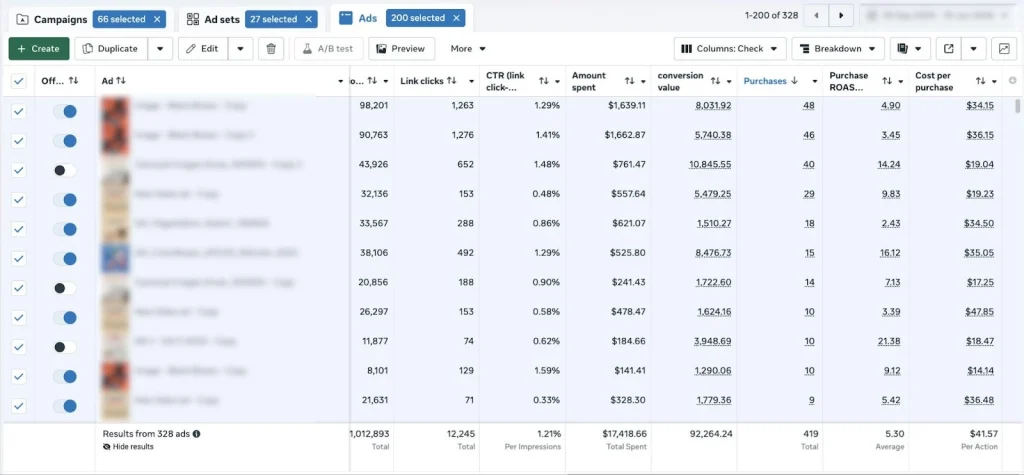
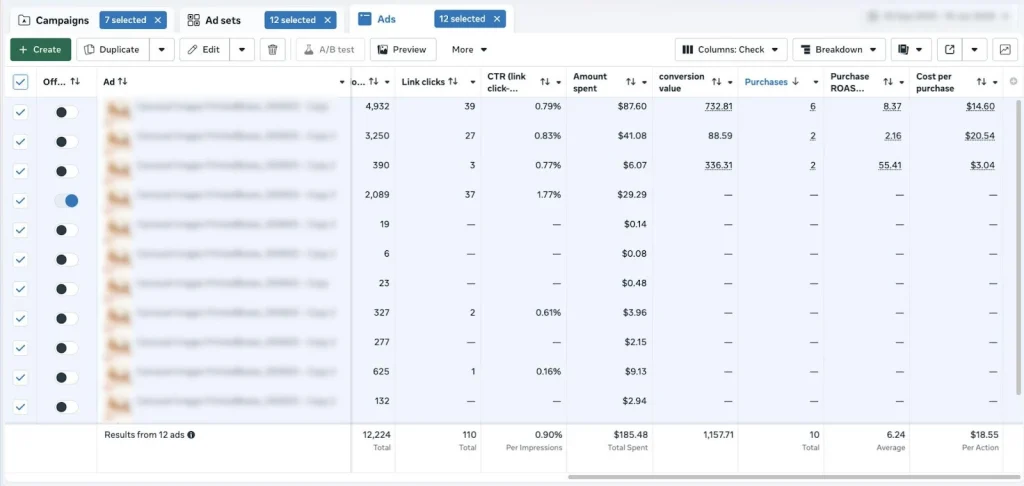
Efficiency Gain: 154% more conversions per $100 spend, CPA down 61%, ROAS up 18%
4. Instagram Trial Reels: Non-Follower Reach Boost (Ongoing Test)
Context: Trial Reels on dormant accounts show clear increases in non-follower reach compared to regular Reels. Platforms push them harder into discovery feeds to test audience response. Early results strong, monitoring consistency through February end.
Mechanism: Algorithm treats Trial Reels as “fresh content tests” from low-activity accounts, prioritizing discovery exposure.
Actionable Steps:
- Create 3-5 Trial Reels weekly on low-activity accounts
- Use trending audio + hooks in first 3 seconds
- Monitor ‘Accounts Reached’ in Insights for non-follower lift
- Scale to main account once pattern confirms
Efficiency Gain: Stronger discovery feed prioritization
5. Social Media VPN Location Strategy (Rahul’s Field Test)
Context: Turning on VPN to match target audience’s location while posting/engaging sends geographic signal to platforms, giving initial visibility boost within that region. More interactions from typically less-active audience segments. Content relevance drives long-term success.
Mechanism: Location-matched posting/engagement creates stronger regional relevance signals during critical first 24-48 hours.
Actionable Steps:
- Install reliable VPN (NordVPN, ExpressVPN)
- Set location to primary target region before creating/posting content
- Engage (like/comment) from same VPN location for 30-60 mins post-publish
- Track regional impressions/interactions in analytics
Efficiency Gain: Initial regional visibility + interaction lift
6. Easy Comment CTAs + Adjacent Interest Content (Rahul’s Organic Tests)
Context A – Specific CTAs: Replacing vague organic CTAs (“What do you think?”) with specific prompts (“Drop 🔥 if agree”, “A if you want templates”) drives higher comment volume + algorithm favor. Users don’t waste time thinking what to say.
Context B – Adjacent Interests: Content themed around target audience’s related interests (coding → tech/design/hackathons/learning tools) boosts reach within the core group. Higher saves, shares, link clicks vs standard posts.
Combined Results: 70% core messaging + 30% adjacent themes = optimal balance.
Actionable Steps:
- CTAs: Swap generic for direct prompts at caption end; test 3-5 variations weekly
- Adjacents: Map 3-5 interests per audience; create 2-3 mixed posts weekly
- Maintain: 70% core messaging to avoid drift; track saves/shares > likes
- Repurpose: Top comments become next content ide
Efficiency Gain: 4x comment rates + core audience penetration
🔍 Strategic Insights from the Field
Insight #1: BigQuery Assisted Conversion Analysis
Think of conversions like a car sales funnel: first-touch only credits the billboard that got them in the door, but assisted analysis recognizes the Google retargeting ad that kept them browsing and the Meta brand ad that sealed the test drive. This tracks all sessions before a purchase, flagging where paid traffic – Google, Meta – appeared anywhere in the journey, not just the first visit. It reveals the true multi-touch role of retargeting and brand ads, often showing paid media drives far more influence than first-touch models alone. This is critical for smarter budget decisions.
Actionable Steps:
- Build an assisted attribution model in BigQuery to evaluate paid media’s role before every purchase
- Use it for performance evaluation and budget allocation decisions
Insight #2: Meta Incremental Attribution – What Really Caused the Sale?
Meta’s Incremental Attribution tries to answer a simple question: Which conversions happened because of my ads, not just after my ads? It removes ‘would-have-bought-anyway’ customers – loyal users, direct buyers, etc. – so the numbers look smaller than normal attribution, but they’re closer to the true lift your ads are actually creating. Concrete example: Standard attribution shows 100 purchases from a campaign. Incremental Attribution might say only 40 of those were truly caused by the ads, and the other 60 likely would have happened without seeing them. Because it’s conservative, it should support your usual attribution metrics, not replace them, so you keep your existing benchmarks stable.
Actionable Steps:
- When setting up a campaign in Meta Ads Manager, select Incremental Attribution as your attribution model at the Adset level
- Run it alongside an existing campaign using your standard attribution model so you can compare the two and understand the gap between attributed and truly incremental conversions
- Use the incremental numbers to check true lift and validate performance before scaling budgets or making big optimization calls
- Continue reporting day-to-day on your standard attribution model to keep your existing benchmarks stable

Insight #3: AI SEO with llms.txt Implementation
AI crawlers exhaust token budgets on HTML, missing your actual content. That’s where llms.txt comes in. It’s a plain-text sitemap that guides AI crawlers to your key pages distraction-free. Low-risk, high-reward for AI search visibility. The best part? You can implement this now on your CMS without over-engineering custom solutions.
Actionable Steps:
- Implement llms.txt via file upload or 301 redirect on your CMS
- List your most important pages for bots like ChatGPT and Perplexity
Insight #4: Co-occurrence and Authority Building in SEO
Links build authority, but co-occurrence builds context. Brands appearing repeatedly alongside competitors in comparisons, ‘best of’ lists, Reddit threads, reviews, and blogs gain category relevance – even without direct links. AI systems use these relational signals for recommendations. Missing these conversations means invisibility despite strong on-site SEO.
Actionable Steps:
- Conversation Placement: Get mentioned in competitor comparison articles, buying guides, Reddit threads
- Category Clustering: Appear consistently with the same peer brands across review sites and industry lists
- Amplify Signals: Guest post, HARO responses, forum contributions where competitors are discussed
- Track: Monitor brand mentions alongside competitors monthly
Insight #5: Meta Ad Account Security – Protect Your Assets
With the number of Meta ad accounts getting hacked on the rise, we’re giving a quick refresh on security insights. To fill security gaps in your Meta ad accounts, implement these four key options for layered defenses, preventing unauthorized escalations and ensuring portfolio-wide protection.
Actionable Steps:
- Verify and secure your business domain in Business Manager to restrict unauthorized asset access
- Limit users by auditing permissions, removing unnecessary invitations, and enforcing role-based restrictions
- Enable 2FA, strong unique passwords, and spending anomaly alerts across all accounts
- Set strict daily budget caps with automated flags for extreme changes during weekends or holidays
Anomaly Response:
- Pause all affected campaigns immediately
- Check payment methods, access controls, permissions, and gather evidence like unusual spend patterns or access logs
- Submit via Meta support chats with daily follow-ups, full documentation, and polite escalations
WordPress Speed Optimization – The Big 3 Fixes
Running a WordPress site? Founders often struggle with slow load times that hurt SEO, bounce rates, and sales. Here are the top 3 most common speed issues and simple fixes.
Problem #1: Slow Load Times (Caching Fix)
Pages reload everything from scratch every visit, making sites feel sluggish. Simple Fix: Use caching to save ready-made page copies worldwide – repeat visitors see instant loads under 10 milliseconds.
- Add Cloudflare CDN (free tier works)
- Install WP Rocket or LiteSpeed Cache plugin
- Enable browser caching in plugin settings
Problem #2: Unoptimized Images
Big photos make pages load forever, especially on mobile. Simple Fix: Convert to WebP format, keep images under 100KB, use tiny SVG icons, and enable smart lazy loading so images load only when scrolled to.
- Convert images to WebP and compress under 100KB using ShortPixel or Imagify plugin
- Switch icons to SVGs via Perfmatters plugin
- Enable ‘lazy loading’ in WP Rocket
- Set fixed sizes on image containers
Problem #3: Render-Blocking CSS/JS
Big CSS and JS files block text and images from showing immediately. Simple Fix: Load only ‘above-fold’ styles first, delay the rest.
- Use WP Rocket’s ‘Remove Unused CSS’
- Preload fonts and hero image in plugin
- Enable ‘Delay JavaScript’ for non-critical scripts
These three fixes alone can dramatically improve your site speed and user experience.
🛠️ Behind the Stack: Advanced AI Tools
Kimi 2.5 – AI Presentation Tool
We just found Kimi 2.5 online, a new AI from Moonshot AI that’s getting buzz for creating presentations super fast. We haven’t tried it ourselves yet, but here’s what stands out from early info.
Key Features:
Turns prompts, notes, or long docs into full slide decks with outlines, bullets, and structure in minutes. Two modes: “Visual” for 5-10 minute quick decks, or “Adaptive” for 30-60 minute deeper research and structure. Handles business reviews, pitch decks, client proposals, and exports editable slides.
How it works: Paste an idea or doc, pick a mode, and it generates polished slides with talking points and design tips. It’s part of their office suite with Docs and Sheets too. We’ll be testing this soon and sharing our experience.
Kling 3.0 – Video AI Upgrade
Kling just launched version 3.0, their latest AI video generator making waves for smoother, more realistic clips. The big upgrade is advanced motion control, letting you direct camera moves, object paths, and character actions with precision. Early buzz says it’s noticeably better for pro-level videos without crazy editing.
Our take: Looks incredibly promising for founders creating explainer videos or social content. We’ll test it this month and share hands-on insights next month.
💡 BONUS TIPS
Bonus Tip #1: Unlock AI Search Prompts in Google Search Console
Here’s something powerful that most marketers are missing. Google Search Console now reveals AI-generated search prompts via long-tail queries – 10+ words or more – that mimic conversational AI Overviews. This helps you track precise user intent and spot emerging trends without relying on guesswork.
Step-by-Step Setup:
- Access GSC Performance report
- Select ‘Search queries’
- Apply custom regex filter: ^(?:\S+\s+){9,}\S+$
This pulls queries like ‘best itinerary for a family trip to Yellowstone National Park including hiking trails and kid-friendly activities.’
Analyze and Apply:
- Export results and feed into Claude or Gemini to extract themes – PR concerns, competitor pricing, specific pain points
- Create monitoring prompts for tools like Profound or Ahrefs to track performance
- Use these insights for video scripts, ad copy, or SEO strategies
Why It Boosts Marketing: You’re tailoring campaigns to real AI-driven searches, improving relevance for education, consulting, or healthcare niches.
Bonus Tip #2: Track AI Prompts in Bing Webmaster Tools
Bing just launched something game-changing. In February 2026, Bing Webmaster Tools introduced its AI Performance dashboard, offering direct visibility into Copilot citations and ‘grounding queries’ – the exact AI-generated prompts retrieving your content.
Quick Setup Steps:
- Verify your site – it’s free and takes under 10 minutes
- Navigate to AI Performance in Bing Webmaster Tools
- Review metrics like Total Citations, Average Cited Pages, and Grounding Queries
You’ll see queries like ‘project management software remote collaboration features comparison 2026.’
Marketing Power Move:
- Export these queries for analysis
- Feed grounding queries into Claude or Gemini to spot intent gaps
- Optimize for education or consulting niches – perfect for refining video campaigns and ad strategies
This is early-stage visibility into how AI is actually finding and citing your content. If you’re not tracking this yet, you’re missing a huge opportunity.
📆 What’s Next
Episode 3 delivered production-proven frameworks: Google Shopping negative keyword mastery, Performance Max competitor targeting, Meta human-element creative psychology, social reach hacks, attribution truth, security moats, and speed optimization.
Single Action Item: Pick ONE experiment → execute this week → drop results in comments.
Monthly Commitment: Your experiment requests shape next month’s tests. TikTok Advantage+? YouTube AI bidding? Tell us below.
